By Selena Chau, Librarian, University of California at Santa Barbara [PDF Full Text]
Online exhibit platforms allow for the curation of a cultural heritage institution’s items beyond the functionality of a digital collections platform. Platforms to build online exhibits include features for multimedia storytelling and audience engagement with primary source materials. In this review, I highlight and compare a few features of Omeka.net, Scalar, Shorthand, Exhibit.so, and CollectionBuilder.
Overview
These platforms, listed in order from oldest to newest, allow users to create an exhibit for free and are accessible to all users, even those with few technology skills. Each platform has an editor tool that stores unpublished projects, and they all offer an online user community that can help provide tips or troubleshoot technical issues. Exhibits created on each platform are easy for audiences to navigate and content areas are resized for mobile devices. None of the platforms offer a backup service.
Search and display functionality varies. Scalar supports their search and retrieval for item and page content. The search bars on Omeka.net and CollectionBuilder retrieve item metadata only, not page content. Shorthand and Exhibit.so do not offer a search bar, though searching page content is always possible in the browser. To get a sense of multilingual support, I tested each platform’s display and retrieval of Chinese and Arabic characters. All platforms support their display and retrieval.
Users should read each platform’s terms of service to protect their rights, content, and personal data. Plan to review terms regularly, as platform services can change. For example, companies may reduce free storage space limits, be bought out by other companies, or halt open-source development. As of July 2024, Exhibit.so notes that by using the service, you grant the company the right and license to use, modify, and distribute your content through its service. Other platforms do not specifically address these rights.
Omeka.net
By now very well known in the archives community, the Omeka project has been described as “WordPress for your exhibitions and collections.”[1] It was launched by the Roy Rosenzweig Center for History and New Media in 2008. Now a project of the Corporation for Digital Scholarship, the Omeka.net platform is offered at varying price points starting at $35 per year. A free trial is also available.
- Home page: https://www.omeka.net/
- Documentation: https://info.omeka.net/build-a-website/
- Terms: https://info.omeka.net/terms-of-service/
- Example: lomaxky.omeka.net
Pros
- An administrative dashboard manages items, collections, and exhibits, as well as users and plugins. Users can group items into collections and describe them according to Dublin Core or Library of Congress terms.
- Administrative users can add collaborative users with different roles and permissions.
- The platform provides access to plugins to support exhibit maintenance and archival workflows, such as an API importer, Google Analytics, Commenting, and Library of Congress Suggest (autocompletion of typed subject terms). More templates and features are available at higher pricing levels.
Cons
- Each item metadata page places a default citation at the bottom of the page, which may not match an institution’s preferred citation. Familiarity with CSS web coding and use of the CSS Editor plugin is necessary to hide the citation.
- Some Omeka.net users report that the platform is less intuitive than WordPress.com and feels a bit clunky.
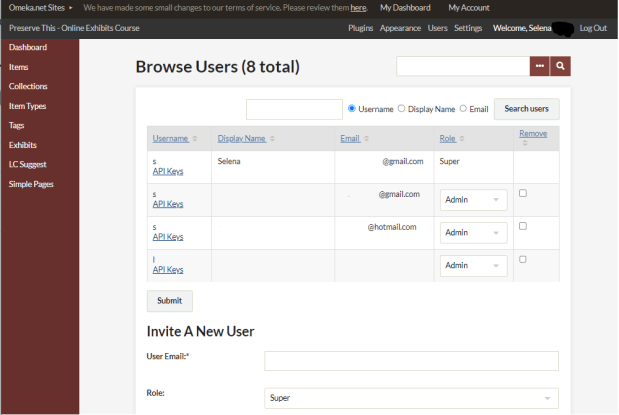
Figure 1. Manage Users section for a Super user in Omeka.net. Only a Super user can invite and manage other users. Admin users will not see a User menu. On the left, navigate to and manage items, collections, tags, and exhibits, as well as the settings for activated plugins.
Scalar
Scalar is an open-source publishing platform from the University of Southern California’s Alliance for Networking Visual Culture. It was beta released in 2012 and is free to use with approval: requests to use the platform are reviewed on a case-by-case basis as described in their registration key form.[2] Like Omeka, it is popular in the digital humanities field. Its original use was for multimodal born-digital scholarship; thus, each project is called a “book” in the editing tool. However, Scalar’s abilities to display content in a variety of layouts and feature media make it a good candidate for exhibits with a strong curatorial narrative.
- Home page: https://scalar.me/anvc/scalar/
- Documentation: https://scalar.usc.edu/works/guide2/index
- Terms: https://scalar.me/anvc/terms-of-service/
- Example: https://scalar.usc.edu/works/exhibiting-historical-art/index
Pros
- Scalar supports collaborative authoring and reader commentary.
- The platform also supports images, video, audio, KML map data, PDF, XML, and more. Users can import ArcGIS web scenes and add maps and annotations as well.
- Scalar offers options to password protect a site, add a Hypothes.is annotation sidebar, and add custom CSS.
- Users can organize content with paths (which place content in a specific order) or tags (which group related content together).
Tip
- With many settings, Scalar may initially seem complex. Getting the most out of the platform requires reading its online documentation.
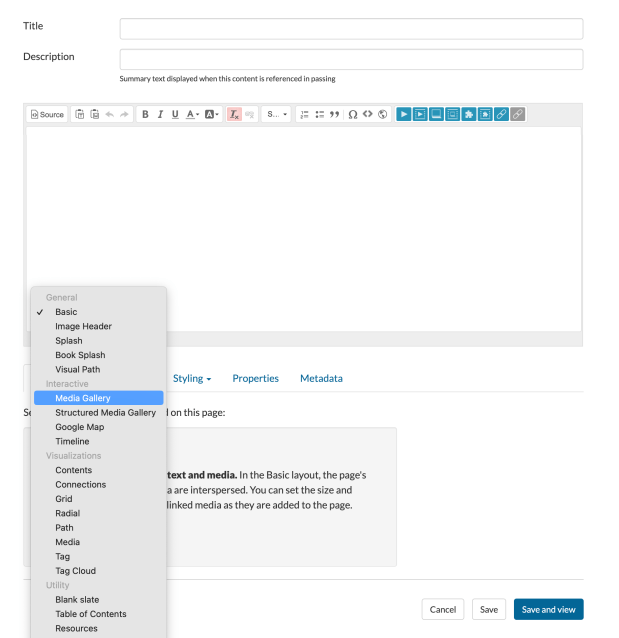
Figure 2. Scalar page editor showing the drop-down list options for page layout
Shorthand
Shorthand was founded in 2013 and is headquartered in Brisbane, Australia. It originally targeted the journalism field but has expanded to a suite of branding, marketing, and analytics services. Creating content with a platform not specifically built around cultural heritage objects allows one to consider the importance of online engagement when competing for an audience’s attention span. The pricing model at the Starter level includes one free published story (i.e., exhibit), with each additional story costing $1 per month (i.e., two stories: $1 per month; five stories: $4 per month).
- Home page: https://shorthand.com/
- Documentation: https://support.shorthand.com/en
- Terms: https://shorthand.com/legal/customer-terms/
- Example (embedded in larger organization webpage): https://www.english-heritage.org.uk/visit/places/kenwood/history-stories-kenwood/rembrandt-self-portrait/
Pros
- The editor uses visual icons, e.g., a wheel icon for settings, a (+) icon to add sections or media. When the mouse hovers over an area, tool tips explain what a section does.
- Content section templates add multimedia, timeline elements, and image galleries.
- Team members can collaborate and edit an exhibit.
- The platform supports image, video, and audio via rich embeds within text blocks. Users can embed exhibits into another web page via iframe.
Cons
- Like the other commercial platforms, the longevity of the platform, support for current features, and the development timeline are unknown.
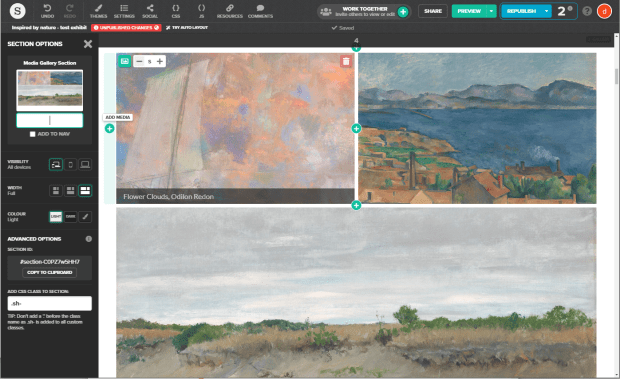
Figure 3. Editor interface of Shorthand showing an image gallery section. Add items to the gallery using the green (+) icon, and change settings on the left side.
Exhibit.so
Exhibit.so is developed by the University of St Andrews and the company Mnemoscene. Mnemoscene specializes in augmented and virtual reality and creative technologies for the cultural heritage sector.
- Home page: https://www.exhibit.so/
- Documentation: https://www.exhibit.so/docs
- Terms: https://www.exhibit.so/docs/terms-of-service
- Example: https://exhibit.so/exhibits/rINkvLJjJbyavcExRRN4
Pros
- Exhibit.so offers a simple interface for linear stories. It also supports the creation of quizzes, kiosks, slide presentations, and scrolling stories using templates.
- The platform supports high-resolution images and 3-D images via IIIF manifest. It also has a zoom-in feature to highlight specific areas of a digital image.
- The basic WYSIWYG (what you see is what you get) content editor allows users to change font color, size, and background color of text sections.
- Users can embed exhibits into another web page via iframe.
Cons
- The free option allows insertion of images by IIIF URL only. Uploading media requires the self-hosted option, which comes with added costs.
- Because content sections need to be added in order of appearance for the exhibit, preplanning is a must. In other words, a new section cannot be added between the first and second content section; each new section must be added at the end.
- There is no gallery section. Images are featured one at a time.
- Per the platform’s terms of service: “By posting Content to the Service, You grant Us the right and license to use, modify, publicly perform, publicly display, reproduce, and distribute such Content on and through the Service.”
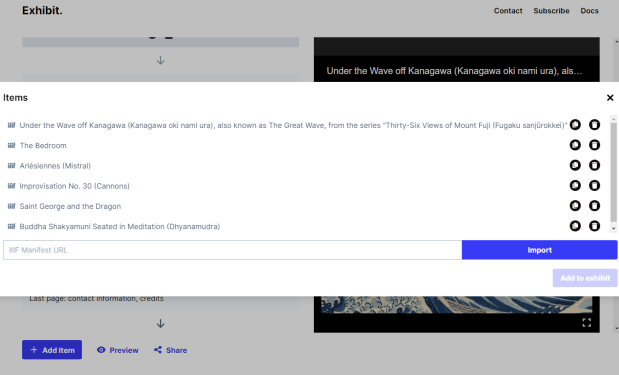
Figure 4. Editor interface of Exhibit.so showing how to add images via an IIIF Manifest URL. After the Item is added to the list, it can be selected and added to the exhibit by clicking the “Add to exhibit” button.
CollectionBuilder
CollectionBuilder uses an open-source framework for creating sustainable digital collections and exhibit websites. It requires a free GitHub account to use. Unlike the other platforms, only web templates are stored online. Your metadata and images need to be stored in another location. Initially funded in 2019, it has been supported by the Institute of Museum and Library Services, National Endowment for the Humanities, Center for Digital Inquiry and Learning at the University of Idaho Library, and the University of Idaho Library. All the technology is open-source and powered by modern static web technology.
- Home page: https://collectionbuilder.github.io/
- Documentation: https://collectionbuilder.github.io/tutorials.html
- Terms: No additional terms besides complying with GitHub’s terms of use
- Example: https://ubc-library-rbsc.github.io/langmann-2021/urbandevelopment.html
Pros
- CollectionBuilder offers three template options (Google Sheets, GitHub, and csv), each with a guided walkthrough.
- CollectionBuilder supports image galleries, maps, timelines, word clouds, and other visualizations.
- The platform offers a built-in method to add analytics tracking snippets to a site.
Cons
- Getting familiar with GitHub may take time. The multi-step editing workflow requires careful attention to the tutorial instructions.
- Users may not be accustomed to working without a WYSIWYG editor. Users must edit files on GitHub or metadata in a spreadsheet and then reload the information to a published page.
- The platform is stronger as a digital collections interface, but the ability to add additional content pages extends its curatorial capabilities.
This article demonstrates the variety of free and low-cost online exhibit platforms available for featuring cultural heritage objects and history. There are even more platform options than the ones listed here. Do you use another low-cost and low-barrier platform for online exhibits? Please share your thoughts with the SAA community by commenting on this piece. Comments should adhere to SAA’s Code of Conduct.[3]
[1] Dan Cohen, “Introducing Omeka,” DanCohen.org (blog), February 20, 2008, https://dancohen.org/2008/02/20/introducing-omeka/.
[2] Scalar, “Scalar Registration Key” (form), accessed July 30, 2024, https://scalar.usc.edu/register/scalar-regkey.
[3] Society of American Archivists, “SAA Code of Conduct,” last reviewed July 2019, https://www2.archivists.org/statements/saa-code-of-conduct.
 The American Archivist Reviews Portal
Great overview! I really appreciate how you broke down each platform’s strengths and trade-offs—it makes it much easier to compare options. The notes on multilingual support and terms of service were especially helpful since those details can be easy to overlook when planning an exhibit.
LikeLike
This is an excellent, clear comparison of exhibit platforms. I appreciate how you covered both strengths and limitations for each option, especially the details on multilingual support and terms of service. Very helpful for planning future projects.
LikeLike